
安装了一个wfphp微商城的程序,需要增加一个关于我们和联系方式以通过域名备案和付费推广站点验证,需要要求站点内容完整,有商家联系方式和介绍信息。用来开户和付费推广。
考虑单独加个关于我们和联系方式页面,后来想直接在 统计代码处加个js弹窗更方便修改。
通过通义写一段代码:提示词
通过统计代码字段,输出一个弹窗,显示关于我们内容。 使用 弹出iframe 内容,都在一段js代码里。iframe内容写道iframe标签,适配手机宽度访问。
<!-- 点击触发弹窗的按钮 -->
<button onclick="showAboutUs()">关于我们</button>

<script>
function showAboutUs() {
    // 如果已经存在弹窗,则不再重复创建
    if (document.getElementById('about-us-iframe')) {
        return;
    }

    // 创建 iframe 元素
    var iframe = document.createElement('iframe');
    iframe.id = 'about-us-iframe';
    iframe.title = "关于我们";

    // 获取设备宽度
    const width = window.innerWidth || document.documentElement.clientWidth || screen.width;

    // 设置自适应尺寸
    const isMobile = width < 600;
    const popupWidth = isMobile ? '90%' : '500px';
    const popupHeight = isMobile ? '80%' : '400px';

    // 使用 srcdoc 内嵌 HTML 内容
    iframe.srcdoc = `
      <!DOCTYPE html>
      <html lang="zh-CN">
        <head>
          <meta charset="UTF-8">
          <title>关于我们</title>
          <style>
            body {
              font-family: Arial, sans-serif;
              padding: 20px;
              background-color: #f9f9f9;
              color: #333;
              margin: 0;
            }
            h2 {
              color: #007BFF;
            }
            p {
              line-height: 1.6;
            }
            ul {
              list-style: none;
              padding-left: 0;
            }
            li::before {
              content: "• ";
              color: #007BFF;
            }
            .close-btn {
              display: block;
              text-align: right;
              margin-top: 20px;
              color: #007BFF;
              cursor: pointer;
              font-weight: bold;
            }
            @media (max-width: 600px) {
              body {
                padding: 15px;
              }
              h2 {
                font-size: 1.2em;
              }
            }
          </style>
        </head>
        <body>
          <h2>关于我们</h2>
          <p>我们是一家致力于提供高质量软件解决方案的科技公司。我们的团队由一群充满激情的开发者、设计师和产品经理组成,专注于为客户提供创新的技术服务。</p>
          <p>如果您有任何问题或合作意向,请随时通过以下方式联系我们:</p>
          <ul>
            <li>邮箱:[email protected]</li>
            <li>电话:+86 123 4567 8901</li>
          </ul>
          <div class="close-btn" onclick="window.parent.closeAboutUs()">关闭</div>
        </body>
      </html>
    `;

    // 设置样式
    iframe.style.position = 'fixed';
    iframe.style.top = '15%';
    iframe.style.left = '50%';
    iframe.style.transform = 'translateX(-50%)';
    iframe.style.width = popupWidth;
    iframe.style.height = popupHeight;
    iframe.style.border = 'none';
    iframe.style.zIndex = '9999';
    iframe.style.backgroundColor = '#fff';
    iframe.style.boxShadow = '0 4px 20px rgba(0,0,0,0.3)';
    iframe.style.overflow = 'auto';  // 支持滚动

    // 创建遮罩层
    var mask = document.createElement('div');
    mask.id = 'about-us-mask';
    mask.style.position = 'fixed';
    mask.style.top = '0';
    mask.style.left = '0';
    mask.style.width = '100%';
    mask.style.height = '100%';
    mask.style.backgroundColor = 'rgba(0,0,0,0.5)';
    mask.style.zIndex = '9998';

    // 定义关闭函数供 iframe 内部调用
    window.closeAboutUs = function () {
        if (document.getElementById('about-us-iframe')) {
            document.body.removeChild(iframe);
            document.body.removeChild(mask);
        }
    };

    // 点击遮罩关闭弹窗
    mask.onclick = function () {
        window.closeAboutUs();
    };

    // 添加元素到页面
    document.body.appendChild(mask);
    document.body.appendChild(iframe);
}
</script>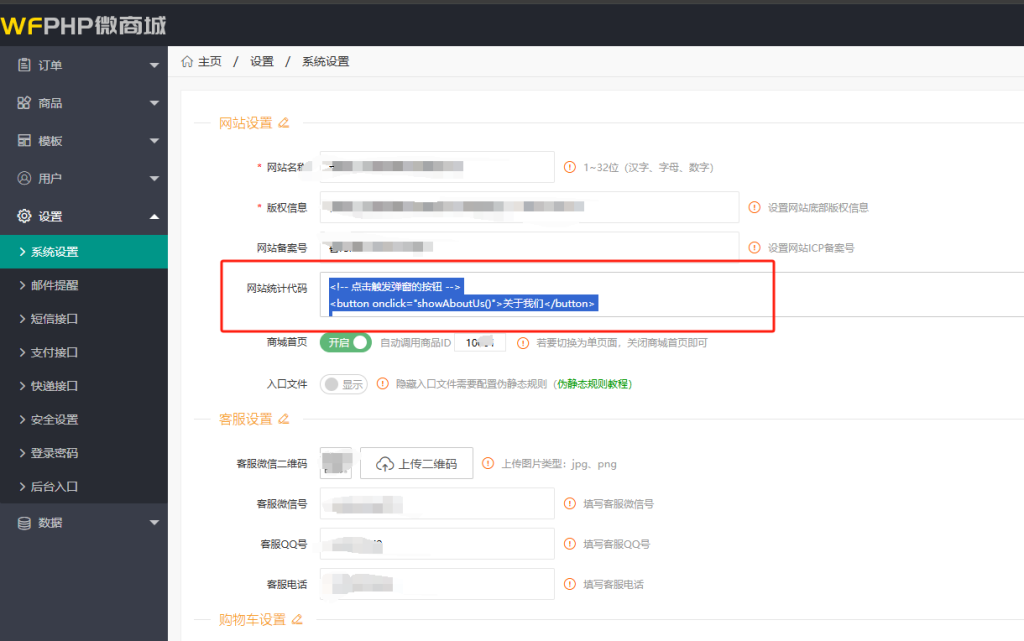
加完以后测试效果: